iFrame Whack-a-Mole - The Studio Orchestration
Part 4: iFrame Whack-a-Mole - The Studio Orchestration
The Story So Far: We have 3D assets. We have skyboxes. Now we need a place for them to live. Welcome to the Hatch-Studios Game Generator.
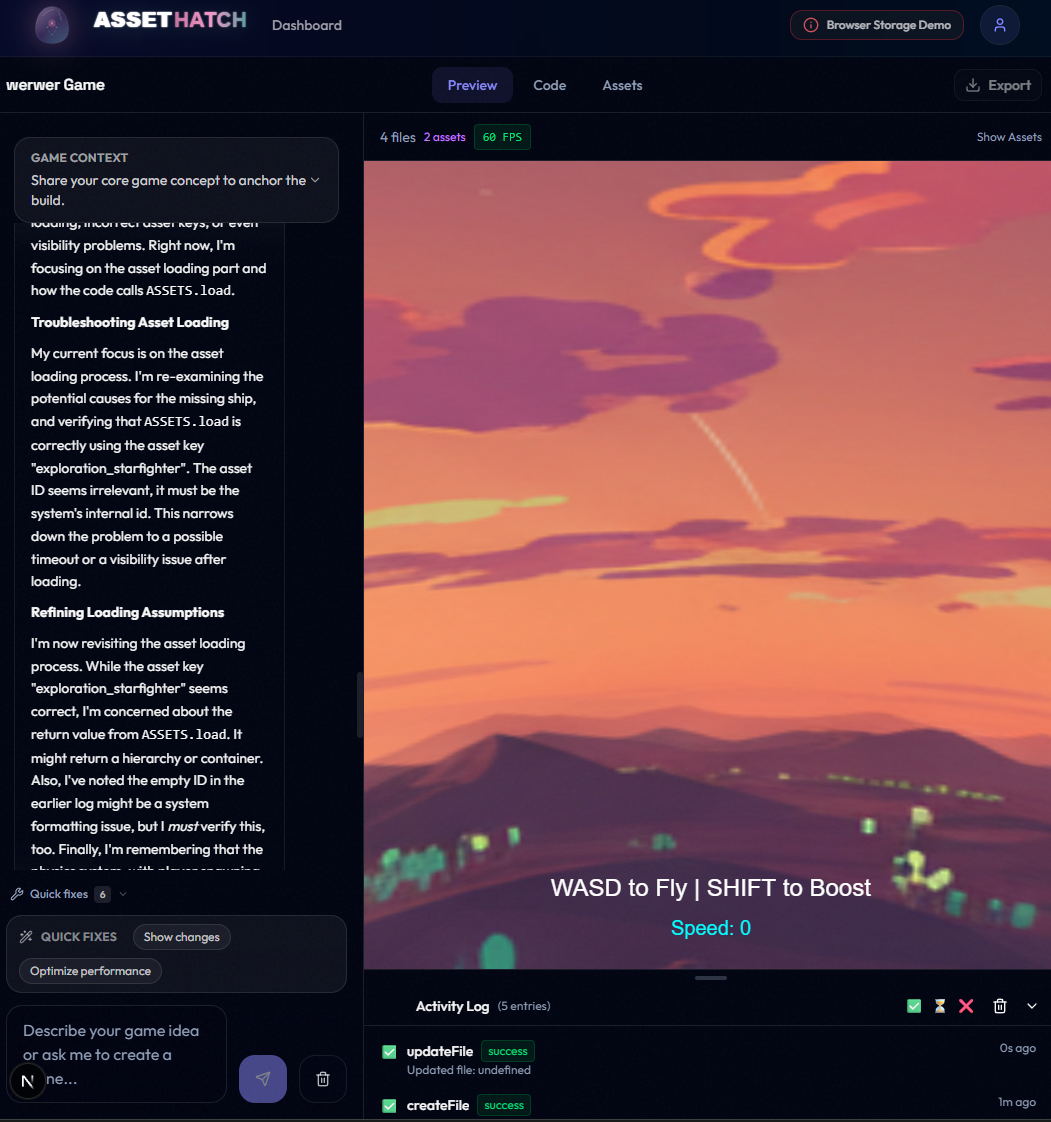
The Ridiculous Goal
It wasn't enough to just generate assets. I wanted the AI to write the game.
I wanted to say: "Make me a horror game set in this nebula with these crates," and have the AI generate the scene, the controls, and the gameplay logic.
To do this, we needed a playground. We chose Babylon.js for the game engine and an iFrame for the sandbox.
The Architecture: Multi-File Chaos
AI agents (Claude, Gemini) are great at writing code, but they get overwhelmed by large files. If I asked for one game.js, the AI would constantly delete the player logic to make room for the level logic.
The Fix: We built an Ordered File Concatenation architecture.
main.js(Engine/Camera)player.js(Movement/Controls)level.js(Environment)game.js(UI/Logic)
The AI writes each file individually, and we smash them together inside the iFrame at runtime.
The Battle: Whack-a-Mole with Race Conditions
The Setup: January 18, 2026. I'm trying to get the player mesh to load before the game logic starts.
It was a disaster.
- Mole #1: The player logic would try to access
scenebeforemain.jshad created it. - Mole #2: The iFrame would lose its WebGL context every time the user switched tabs.
- Mole #3: The assets were being blocked by CORS because the iFrame was a "different origin."
I spent three days playing "Whack-a-Mole" with these race conditions. My AI agents were making it worse—trying to "fix" it with hacky setTimeout calls that only worked half the time.
The Solution: Strict Global Scope
I had to put my foot down. I dictated a set of Universal Rules for the studio (codified in ADR-024):
- No local functions: Everything must be on the global scope so files can talk to each other.
- Explicit Handoffs:
main.jsemits an event when the engine is ready. - The Asset Proxy: We built a dedicated API route to stream assets from the main app into the iFrame without CORS hell.
// The pattern we forced the AI to use
// player.js
window.player = BABYLON.MeshBuilder.CreateBox("player", {}, scene);

// game.js
scene.onBeforeRenderObservable.add(() => {
  if (window.player) {
    window.player.rotation.y += 0.01;
  }
});
The First "Game"
After days of frustration, I finally saw it. A spinnable 3D character, in a starry skybox, with a working "Move to Click" script.
It worked.
The Realization: Building the studio wasn't about the AI being "smart" enough to build a game. It was about me being vigilant enough to build the infrastructure that allowed it to succeed.
Commit References:
4e5f6g7- Implement multi-file ordered concatenation for Game Gen7h8i9j0- Add asset loading proxy and skybox linking to iFrame
Related Files:
src/memory/adr/024-multi-file-game-code-architecture.mdsrc/components/studio/PreviewFrame.tsx
Code: components/studio/PreviewFrame.tsx
Jordan Hindo
Full-stack Developer & AI Engineer building in public. Exploring the future of agentic coding and AI-generated assets.
Get in touch